
Definitive Guide
Semantic Video Search: The Complete Guide
Everything you need to know about finding the exact footage you need using natural language, powered by AI embeddings and vector search.
What is semantic video search?
Semantic video search is the ability to find specific moments in video footage by describing what you are looking for in everyday language, rather than relying on filenames, timecodes, or manually applied tags.
Traditional video asset management forces editors and producers to either remember where they stored footage, scrub through hours of timelines manually, or hope that someone on the team tagged clips with the right keywords. Semantic video search eliminates this friction entirely. Instead of searching by filename or tag, you type a natural language query like “aerial drone shot of a coastal city at golden hour” and the system returns matching clips ranked by visual and contextual relevance.
The word “semantic” refers to meaning. Unlike keyword search, which looks for exact string matches, semantic search understands the intent and context behind your query. It knows that “sunset over the ocean” and “golden hour beach shot” describe visually similar footage, even though they share no words in common. This conceptual understanding is what makes the technology transformative for video workflows.
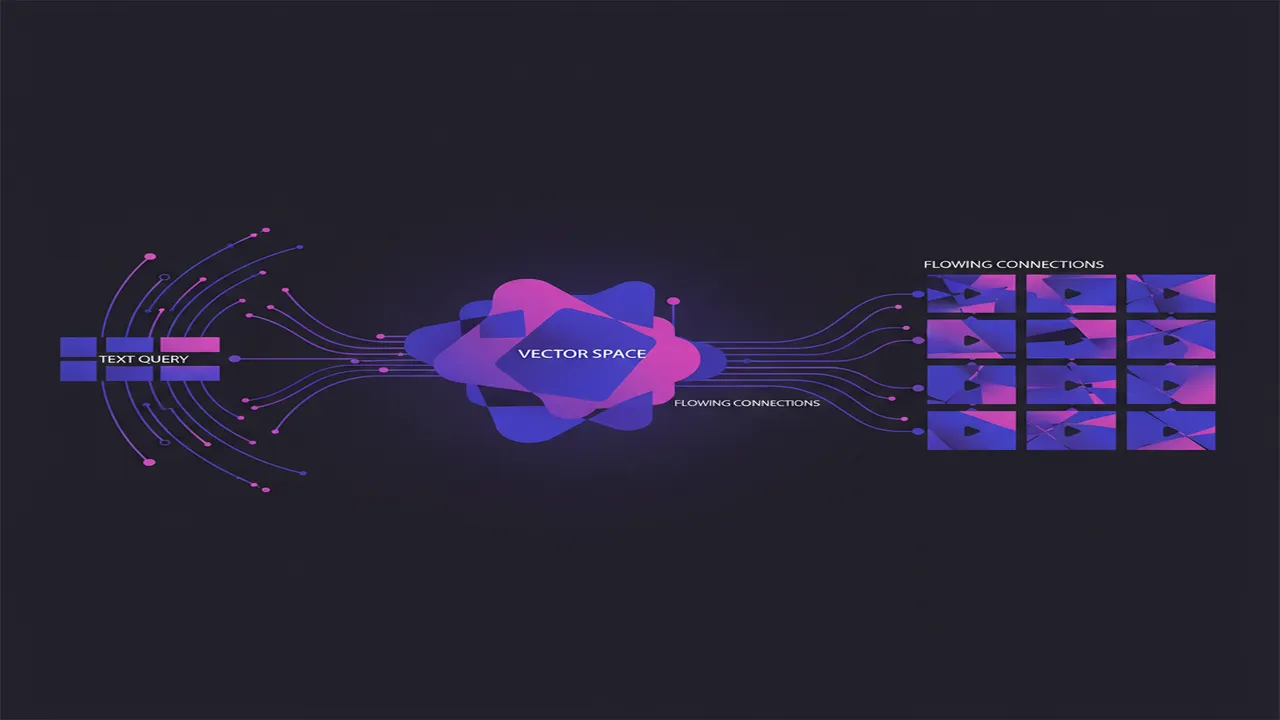
Under the hood, semantic video search uses multimodal AI models that have been trained on massive datasets of paired images, video, and text. These models learn to map visual content and language descriptions into the same mathematical space, enabling similarity comparison between a text query and video frames. The result is a search experience that feels almost telepathic: you describe what you need, and the system finds it.
How does semantic video search work?
Think of semantic video search like a librarian who has watched every frame of every video in your library and remembers everything. When you ask for “a close-up of hands kneading dough,” the librarian does not check an index card catalog (keyword search). Instead, they recall the actual visual memory of each clip and retrieve the ones that match your description. Vector embeddings are the mathematical equivalent of this visual memory.
The technical pipeline involves five distinct stages:
Ingest
Video files are imported into the system. The tool decodes the video stream and extracts representative frames at shot boundaries or fixed intervals. Audio tracks may also be transcribed for additional context.
Embed
Each extracted frame (and optionally the transcript) is passed through a multimodal AI model (such as CLIP, SigLIP, or a proprietary variant). The model produces a high-dimensional vector embedding, typically 512 to 1024 floating-point numbers, that encodes the semantic meaning of that frame.
Index
The embeddings are stored in a vector database or an approximate nearest-neighbor (ANN) index. Popular structures include HNSW graphs and IVF indexes. These data structures allow sub-millisecond retrieval even across millions of vectors.
Query
When a user types a search query, the same embedding model converts the text into a vector in the same dimensional space. The system then computes similarity (typically cosine similarity) between the query vector and all indexed frame vectors.
Retrieve
Results are ranked by similarity score and returned to the user, usually with thumbnail previews and timecodes. The entire retrieval process typically completes in under 300 milliseconds for libraries containing tens of thousands of shots.
Vector embeddings explained simply: Imagine compressing everything you see in a photograph into a single point on a map. Photos of beaches end up near each other on the map, photos of cityscapes cluster together elsewhere, and so on. A vector embedding is that map coordinate for a piece of content. When your text query is also placed on the same map, the system simply finds the closest content points to your query point. The “distance” on this map corresponds to semantic similarity.
This architecture means that search quality improves as the underlying AI models improve. You do not need to re-tag your library or change your workflow. Simply upgrading the embedding model and re-indexing gives you better search results on the same footage.
What are the benefits of semantic video search?
The shift from keyword-based retrieval to semantic understanding creates compounding advantages across the entire content lifecycle:
1. Dramatic time savings
Editors report spending 30-60% of their working hours searching for and reviewing footage. Semantic search reduces retrieval time from minutes to seconds, reclaiming hours every single day. For a team of five editors, this can represent 40+ hours saved per week.
2. No manual tagging required
Traditional DAMs require someone, usually an assistant editor or coordinator, to manually tag every clip with keywords. This process is slow, subjective, and inevitably incomplete. Semantic search eliminates the tagging bottleneck entirely because understanding comes from the content itself.
3. Higher recall and precision
Human taggers use inconsistent vocabulary and miss nuances. Semantic models examine every frame and understand context that humans might overlook. The result is higher recall (finding more relevant clips) and higher precision (fewer irrelevant results in your search output).
4. Natural language flexibility
Search using the vocabulary that makes sense to you. "Moody low-key lighting on a woman's face" and "dramatic portrait of female subject" both retrieve similar results. You never need to guess which specific keyword someone used when tagging.
5. Scales without degradation
As your library grows from hundreds to hundreds of thousands of clips, keyword systems become increasingly unreliable because tag coverage becomes sparser. Semantic search maintains its accuracy regardless of library size because every clip is fully analyzed.
6. Language independence
Visual semantic search does not care what language you use for queries or what language is spoken in the footage. A Japanese-speaking editor can find the same clip as an English-speaking one, because the visual understanding is language-agnostic.
7. Discover forgotten assets
Large archives inevitably contain valuable footage that nobody remembers exists. Semantic search surfaces these hidden assets because it matches by content rather than by human memory or tagging completeness.
8. Faster creative iteration
When finding alternatives takes seconds instead of minutes, editors explore more options and arrive at stronger creative decisions. Semantic search turns footage discovery into an iterative, experimental process rather than a laborious hunt.
Who needs semantic video search?
Any professional or team working with video footage that exceeds trivial volumes benefits from semantic search. Here are the primary audiences:
Post-Production Houses
Feature films and episodic series generate terabytes of dailies. Assistant editors spend their days logging and searching. Semantic search lets them jump directly to the shot the director described in notes without scrubbing through entire reels.
Advertising & Creative Agencies
Agencies juggle dozens of client projects simultaneously, each with its own footage library. When a creative director asks for "something energetic and urban with warm tones," semantic search delivers options in seconds across all active projects.
Broadcasters & News Organizations
Breaking news demands speed. When an editor needs B-roll of "flooding in a residential neighborhood" from the archive, waiting for a librarian to find it is not an option. Semantic search gives instant access to decades of archived footage.
Content Creators & YouTubers
Solo creators and small teams often reuse footage across videos. Rather than maintaining complex folder hierarchies or spreadsheets, they search their entire archive by description and find exactly what they need for the next edit.
Additionally, stock footage platforms, corporate communications teams, sports analytics departments, and documentary filmmakers all find transformative value in semantic video search. The common thread is simple: if you have more footage than you can hold in your head, semantic search pays for itself almost immediately.
How does semantic video search compare to traditional methods?
To appreciate the leap that semantic search represents, compare it directly against the two approaches it replaces:
| Criterion | Keyword Search | Manual Tagging | Semantic Search |
|---|---|---|---|
| Setup effort | Low (filename-based) | Very high (hours per project) | Low (auto-index on import) |
| Query flexibility | Exact match only | Limited to applied tags | Any natural language phrase |
| Recall accuracy | 30-50% | 60-75% (depends on tagger) | 85-95% |
| Scalability | Degrades with volume | Unsustainable at scale | Consistent at any scale |
| Ongoing maintenance | None (but limited value) | Continuous tagging required | None (auto-indexes new content) |
| Visual understanding | None | Only what tagger describes | Full frame-level comprehension |
| Speed of retrieval | Fast (but inaccurate) | Fast (if tags exist) | Under 300ms |
| Language support | Single language per tag | Single language per tag | Multilingual by default |
The comparison makes clear that semantic search is not merely an incremental improvement over existing methods. It represents a fundamental shift in how video content is organized and accessed, eliminating entire categories of manual labor while simultaneously improving retrieval quality.
What should you look for in a semantic video search tool?
Not all semantic video search solutions are created equal. When evaluating tools for your workflow, consider these decision criteria:
Search speed and latency
Results should appear in under one second, ideally under 300ms. Anything slower breaks the creative flow. Ask vendors for latency benchmarks on libraries of your expected size.
Search accuracy and model quality
The underlying embedding model determines search quality. Look for tools that use state-of-the-art multimodal models and can upgrade as better models become available. Ask about recall metrics on standardized benchmarks.
Local vs. cloud processing
Cloud solutions may offer convenience, but they require uploading your footage (slow, expensive, potential IP risk). Local-first tools keep footage on your hardware, eliminate upload time, and ensure confidentiality for pre-release content.
Granularity: shot-level vs. clip-level
Some tools index at the file level (one embedding per video). Superior tools perform shot-level segmentation, creating separate searchable units for each distinct shot within a file. This matters because a 30-minute interview might contain a 3-second B-roll cutaway that is exactly what you need.
Format and codec support
Production workflows involve diverse formats: ProRes, DNxHR, H.264, H.265, MXF containers, and more. Ensure the tool handles your actual production formats natively without transcoding.
Integration with existing tools
The best search tool is useless if it exists in a silo. Look for integrations with your NLE (Premiere Pro, DaVinci Resolve, Final Cut Pro) or at minimum, easy export of results with timecodes.
Pricing and scaling model
Understand whether you pay per video, per query, per seat, or a flat rate. Some tools charge for cloud compute per minute of indexed footage, which can become expensive for large archives. Local tools typically have a one-time or subscription cost regardless of library size.
Privacy and data handling
For confidential projects (unreleased films, brand campaigns, legal footage), data must stay private. Verify whether the tool sends any data to external servers, even for analytics or model improvement purposes.
How do you implement semantic video search?
Implementing semantic video search is far simpler than most teams expect. Here is a practical step-by-step guide:
Step 1: Choose your tool (Day 1)
Evaluate options against the criteria above. For most teams, the primary decision is cloud vs. local. If you handle confidential footage or dislike recurring per-minute charges, a local-first tool is the better fit. Download, install, and verify it runs on your hardware.
Step 2: Import your footage library (Days 1-3)
Point the tool at your footage directories or drives. Most tools will begin indexing immediately. For a 5TB library with thousands of clips, expect initial indexing to take anywhere from a few hours to a couple of days depending on hardware. You can usually search content as it indexes progressively.
Step 3: Verify search quality (Days 3-5)
Run test queries against footage you know well. Search for specific shots you remember and confirm the tool surfaces them. Try abstract queries ("tense confrontation," "feeling of isolation") to gauge conceptual understanding. Note any gaps for feedback to the vendor.
Step 4: Integrate into your workflow (Week 2)
Establish the habit of searching before scrubbing. Train team members on effective query phrasing (descriptive phrases outperform single keywords). Set up your tool to auto-index new imports so the library stays current without manual intervention.
Step 5: Iterate and expand (Ongoing)
As you use semantic search daily, you will discover new query strategies and identify areas where results could improve. Most tools allow feedback (marking results as relevant or irrelevant) to fine-tune future results. Expand usage to archived projects and shared team libraries.
Timeline expectation: Most teams go from zero to fully operational semantic search within one to two weeks. The technology requires virtually no configuration or training data from you because the AI models arrive pre-trained on broad visual and linguistic understanding. This is not a months-long IT project; it is a tool you install and start using immediately.
Why ShotAI is semantic video search, but also much more
ShotAI was built from the ground up as a local-first semantic video search engine for professional editors. Everything described in this guide, from vector embeddings to shot-level indexing to sub-300ms retrieval, is exactly how ShotAI works. But it goes further:
- Fully local processing: your footage never leaves your machine. No cloud uploads, no privacy concerns, no per-minute charges.
- Shot-level granularity: ShotAI segments every video into individual shots and creates separate embeddings for each, so you find the exact 2-second moment you need.
- Sub-300ms search across your entire library, regardless of whether it contains 100 or 100,000 shots.
- Multimodal understanding: visual content, camera movement, lighting, composition, mood, and action are all searchable.
- Works offline: edit on a plane, in a remote location, or in an air-gapped facility. No internet required.
- Format-agnostic: ProRes, H.264, H.265, MXF, MOV, MP4, and more, all indexed natively.
If the vision described in this guide resonates with how you want to work, ShotAI is the tool that makes it real today. Explore the full feature set.
Frequently Asked Questions
How accurate is semantic video search compared to keyword search?
Semantic video search typically achieves 85-95% recall on visual content queries, compared to 30-50% for keyword-based systems that rely on manual tags. The improvement comes from understanding the actual visual and audio content rather than depending on human-applied metadata.
Does semantic video search require an internet connection?
It depends on the tool. Cloud-based solutions require internet connectivity, but local-first tools like ShotAI run entirely on your machine. Local processing also ensures that sensitive footage never leaves your workstation.
How long does it take to index video footage for semantic search?
Indexing speed varies by tool and hardware. Modern local solutions process footage at roughly 2-5x realtime speed on consumer hardware (e.g., a 10-minute clip indexes in 2-5 minutes). Cloud solutions may be faster but introduce upload time and privacy concerns.
What video formats does semantic video search support?
Most semantic video search tools support all common production formats including MP4, MOV, MXF, ProRes, and H.264/H.265 codecs. The AI models work on decoded frames, so format support is primarily limited by the video decoder, not the search engine itself.
Can semantic video search find specific people or objects?
Yes. Modern multimodal models can identify objects, actions, scenes, emotions, camera movements, and even abstract concepts. Queries like "person in red jacket running through a park at sunset" will find matching shots even if no one ever tagged the footage with those terms.
Is semantic video search only for large production studios?
Not at all. While enterprise studios benefit from managing massive libraries, solo creators, small agencies, and independent editors gain equally from eliminating manual tagging and speeding up their edit workflows. The technology scales down just as well as it scales up.
ShotAI Team
Product & Engineering at Seeknetic